
Highlights
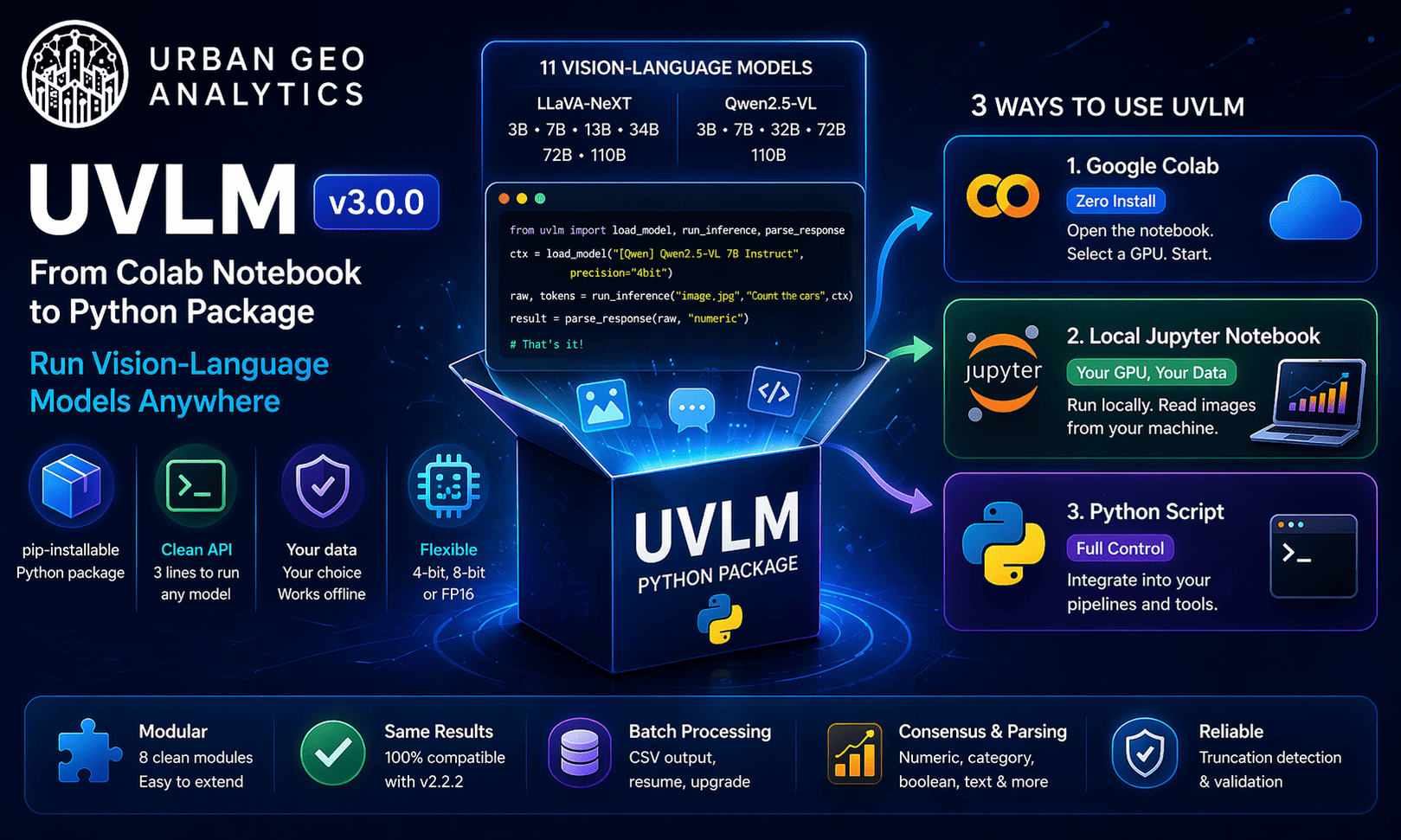
- UVLM is now a pip-installable Python package — no longer tied to Google Colab
- Run on your own GPU with a local Jupyter notebook, or keep using Colab for free
- Same tool, more flexibility — three lines of Python to load a model and analyse images
When we released UVLM in March 2026, it was a Google Colab notebook. You opened it in your browser, picked a model, typed your prompts, and ran your images — all without installing anything. That simplicity was the point: a tool that anyone could use to load and compare Vision-Language Models, regardless of their technical setup.
But we kept hearing the same requests. Can I run this on my own machine? Can I call UVLM from a script? Can I integrate it into an existing pipeline? The answer was always the same: not easily. The entire tool lived inside a single notebook, with all the logic packed into three massive code cells. Moving it anywhere else meant copy-pasting thousands of lines and untangling global variables.
Version 3.0.0 changes that. UVLM is now a proper Python package.
What Changed
The core logic — model loading, dual-backend inference, response parsing, consensus validation, batch processing — has been extracted from the notebook into eight standalone Python modules. These modules have no dependency on Google Colab, no global variables, and no widget code. They are plain Python functions that accept arguments and return results.
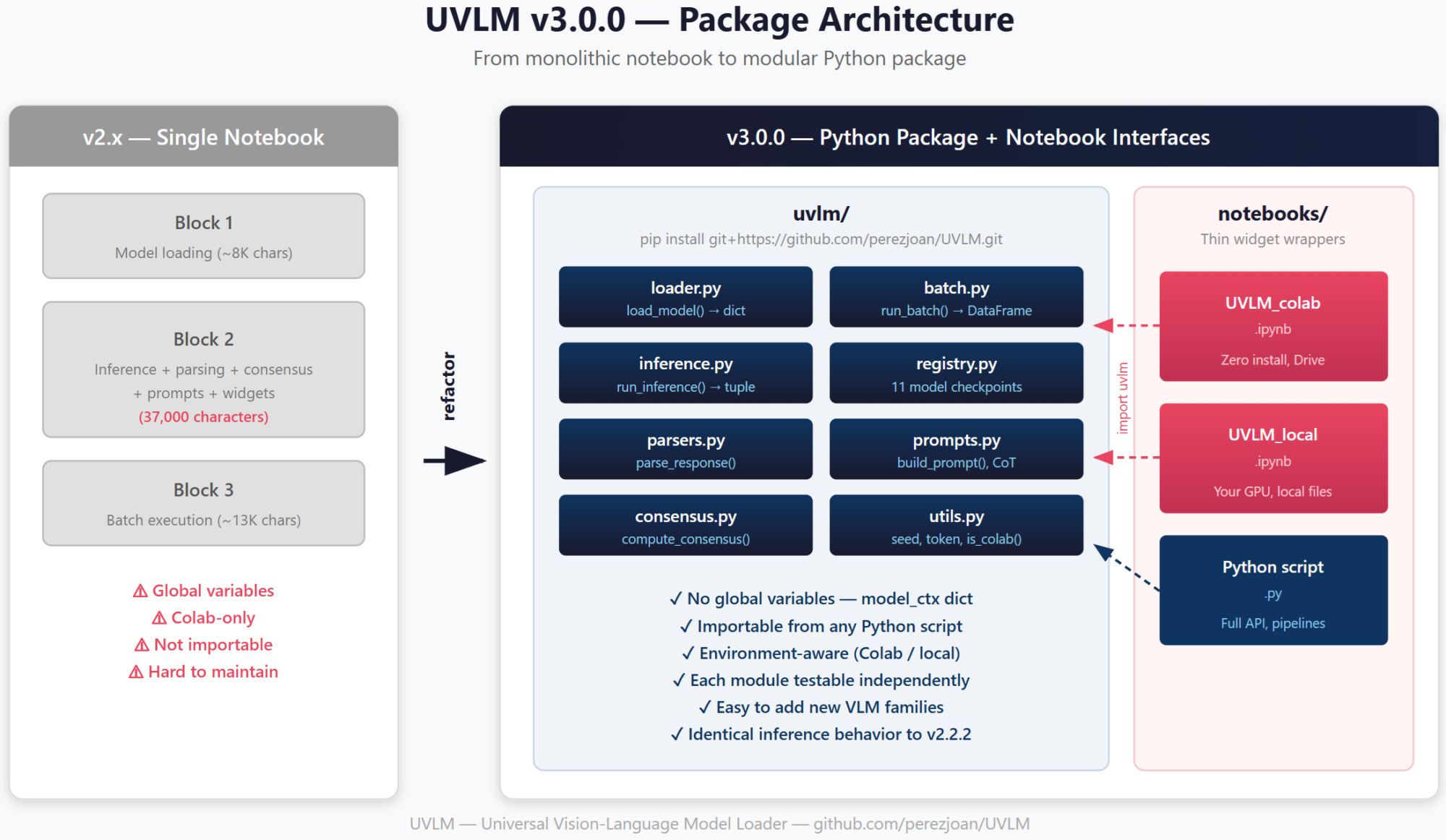
The package is installed from GitHub in one line:
pip install git+https://github.com/perezjoan/UVLM.git
On Google Colab, this happens automatically in the first cell of the Colab notebook. On your local machine, you run it once in a terminal and you are done.
Nothing changed in how UVLM analyses images. The same 11 model checkpoints are supported (LLaVA-NeXT and Qwen2.5-VL, from 3B to 110B parameters). The same parsing logic, the same consensus validation, the same truncation detection. If you had a workflow built on v2.2.2, the outputs will be identical.
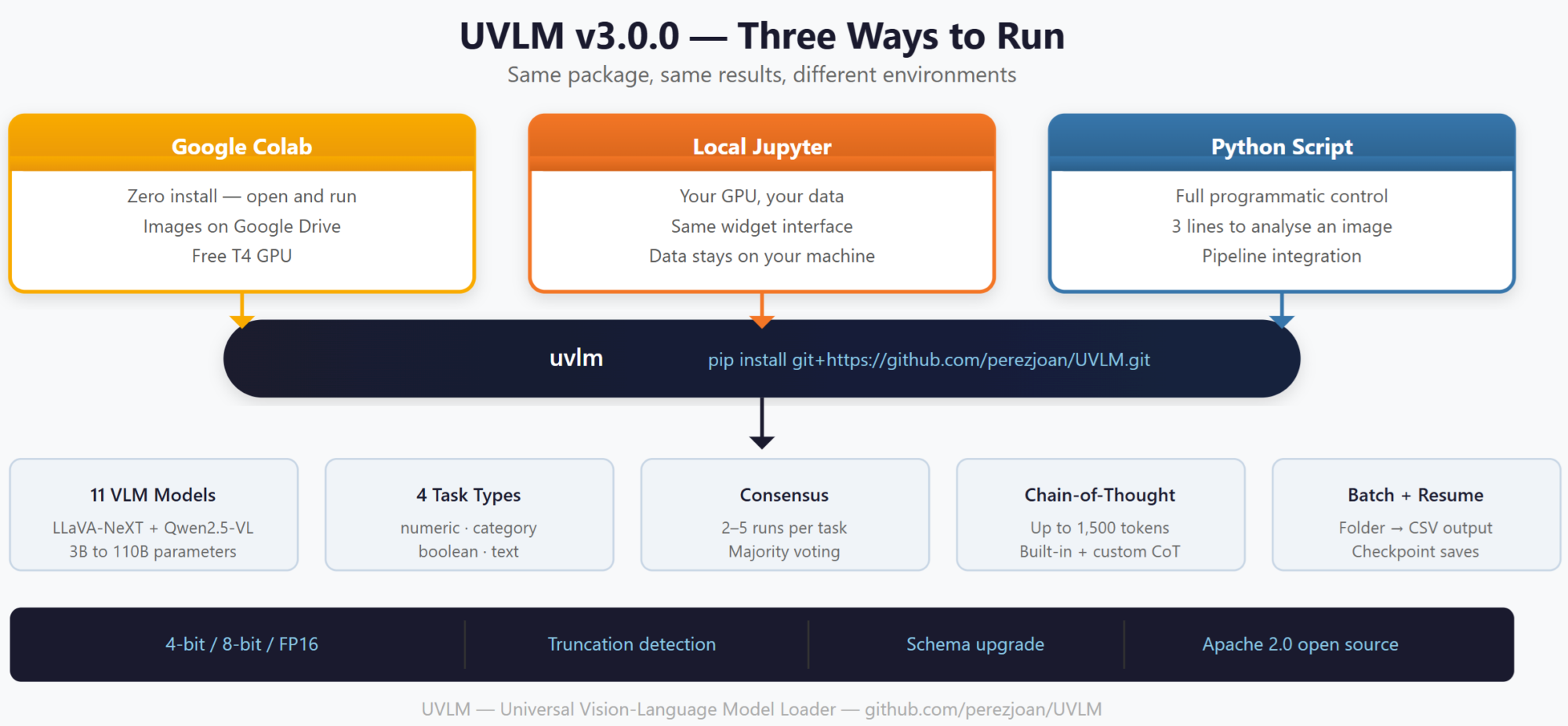
Three Ways to Use UVLM
Google Colab — Zero Install
This is the same experience as before. Open the Colab notebook, select a GPU runtime, and start working. The notebook installs the UVLM package automatically. Images are loaded from Google Drive. Nothing has changed for Colab users, except that the code running behind the widgets is now cleaner and easier to maintain.
Local Jupyter Notebook — Your GPU, Your Data
If you have an NVIDIA GPU on your workstation (or access to a GPU server), you can now run UVLM locally. The local Jupyter notebook provides the same widget-based interface — model selection dropdown, prompt builder form, batch execution button — but images are read from your local filesystem and results are saved locally. No Google account needed, no data leaves your machine.
This matters for researchers working with sensitive imagery (medical, security, proprietary datasets) or for anyone who wants faster and more reliable model loading than what Colab’s network provides.
Python Script — Full Programmatic Control
For integration into larger pipelines, UVLM now exposes a clean API. Three lines of code replace the entire notebook workflow:
from uvlm import load_model, run_inference, parse_response
ctx = load_model("[Qwen] Qwen2.5-VL 7B Instruct", precision="4bit")
raw, tokens = run_inference("photo.jpg", "Count the cars", ctx)
result = parse_response(raw, "numeric")
The `load_model()` function returns a context dictionary containing the model, processor, backend type, and device information. This dictionary is passed to every subsequent function — no global state, no hidden side effects. You can load multiple models in the same session and switch between them by passing different context objects.
For batch processing, `run_batch()` handles the full pipeline:
from uvlm import load_model
from uvlm.batch import run_batch

ctx = load_model("[Qwen]  Qwen2.5-VL 7B Instruct", precision="4bit")
df = run_batch(
    model_ctx=ctx,
    task_specs=my_tasks,
    image_folder="./images",
    output_path="./results.csv",
)
Under the Hood: Package Structure
The monolithic notebook has been split into eight modules, each with a single responsibility:
registry.py holds the model dictionary — 11 checkpoints with their backend type and HuggingFace checkpoint ID. Adding a new model is one line in a dictionary.
loader.py contains the `load_model()` function. It handles quantisation configuration (4-bit, 8-bit, FP16), device placement (single GPU, auto, CPU offload), and the LLaVA vs Qwen branching logic. It returns a dictionary — not a set of global variables.
inference.py contains `run_inference()`, the dual-backend forward pass. It accepts a model context dictionary and returns the raw response plus the exact token count as a tuple. The full LLaVA response cleaning logic and the full Qwen token-trimming pipeline are preserved exactly as they were.
parsers.py holds the four response parsers (numeric, category, boolean, text) and the advanced reasoning parser. These are pure functions with zero dependencies beyond Python’s standard library.
consensus.py contains the majority voting logic. batch.py handles folder iteration, CSV writing, resume mode, and schema upgrading. prompts.py stores the task type definitions and the chain-of-thought templates. utils.py provides seed management, environment detection, and HuggingFace token retrieval.
Getting Started
On Colab: Open the notebook from GitHub and run the three blocks as before. The package installs itself.
Locally: First, install PyTorch with CUDA support matching your GPU driver (check with `nvidia-smi`). For example, with CUDA 12.8+:
pip install torch torchvision --index-url https://download.pytorch.org/whl/cu128
pip install git+https://github.com/perezjoan/UVLM.git
pip install torch torchvision --index-url https://download.pytorch.org/whl/cu128
pip install git+https://github.com/perezjoan/UVLM.git
Then open the local Jupyter notebook.
You get the same dropdown menus, the same prompt builder form, the same batch execution. The only difference is that you type a local path for your image folder instead of a Google Drive path.
For HuggingFace authentication (needed for some gated models like LLaMA3-based checkpoints), either set the `HF_TOKEN` environment variable or run `huggingface-cli login` once in your terminal.
What Is Next
The package architecture makes it much easier to add new VLM families. InternVL, BLIP-2, CogVLM, DeepSeek-VL, and Molmo are planned for future releases — each one requires implementing the backend-specific sections of the inference function and adding entries to the registry, without touching the rest of the codebase.
We are also working on multi-GPU batching for parallel inference across images, video frame analysis support, and integration with the SAGAI workflow for automated streetscape analysis.
Links
Source code: github.com/perezjoan/UVLM
Paper: arXiv preprint — Perez & Fusco (2026)
UVLM page on this site: urbangeoanalytics.com › Software & Algorithms › UVLM
Previous blog post: Introducing UVLM: A Free Tool to Compare AI Models That Understand Images
Citation
If you use UVLM in your work, please cite:
Perez, J. & Fusco, G. (2026). UVLM: A Universal Vision-Language Model Loader for Reproducible Multimodal Benchmarking. arXiv:2603.13893
Table of contents
Leave A Comment