
Latest release — v4.0.0 (August 2026)
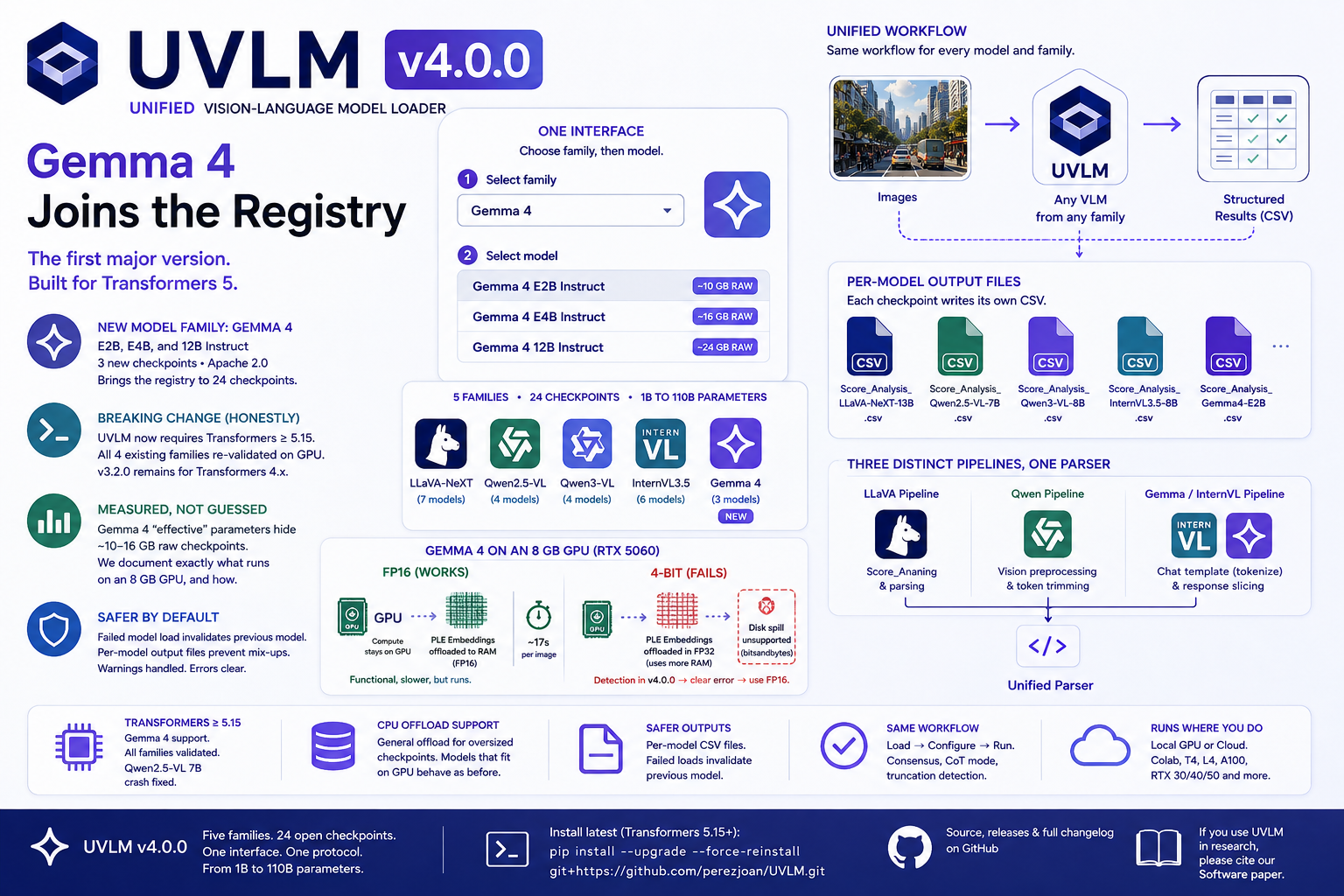
UVLM’s first major version adds Gemma 4 (Google DeepMind, April 2026) as a fifth model family — E2B, E4B, and 12B Instruct — and migrates to Transformers 5, which Gemma 4 requires. All four pre-existing families were re-validated on GPU under Transformers 5.15 before release, including Qwen2.5-VL, whose load crash on early 5.x releases motivated the previous version cap; the issue is confirmed fixed. The registry now stands at 24 checkpoints across 5 families, from 1B to 110B parameters. Environments that must remain on Transformers 4.x can pin the last compatible release with pip install git+https://github.com/perezjoan/UVLM.git@v3.2.0. Read the full release notes on the blog post [link to uvlm-4-0-0-gemma-4-transformers-5], previous releases (v3.1.0 Qwen3-VL, v3.2.0 InternVL3.5) on the Scientific Blog, or see VERSIONS.txt on GitHub.
What is UVLM?
UVLM is an open-source Python package that provides a unified interface for loading, configuring, and evaluating multiple Vision-Language Model (VLM) architectures on custom image analysis tasks. It abstracts the substantial architectural differences between VLM families behind a single inference function, enabling researchers and practitioners to compare models using identical prompts and evaluation protocols — without writing model-specific code.
VLMs can interpret images and respond to arbitrary natural language queries about their content — counting objects, classifying scenes, estimating measurements, detecting features. But each model family requires its own processor classes, tokenisation logic, generation configuration, and output parsing. UVLM solves this by routing every inference call through a single backend-agnostic function, regardless of the underlying model.
Since v3.0.0 (April 2026), UVLM is a pip-installable package that runs anywhere Python runs — Google Colab, local Jupyter notebooks, or plain scripts. No GPU ownership required for Colab; for local use, any NVIDIA GPU with 8+ GB VRAM handles models up to 7B parameters in 4-bit quantisation.
Installation
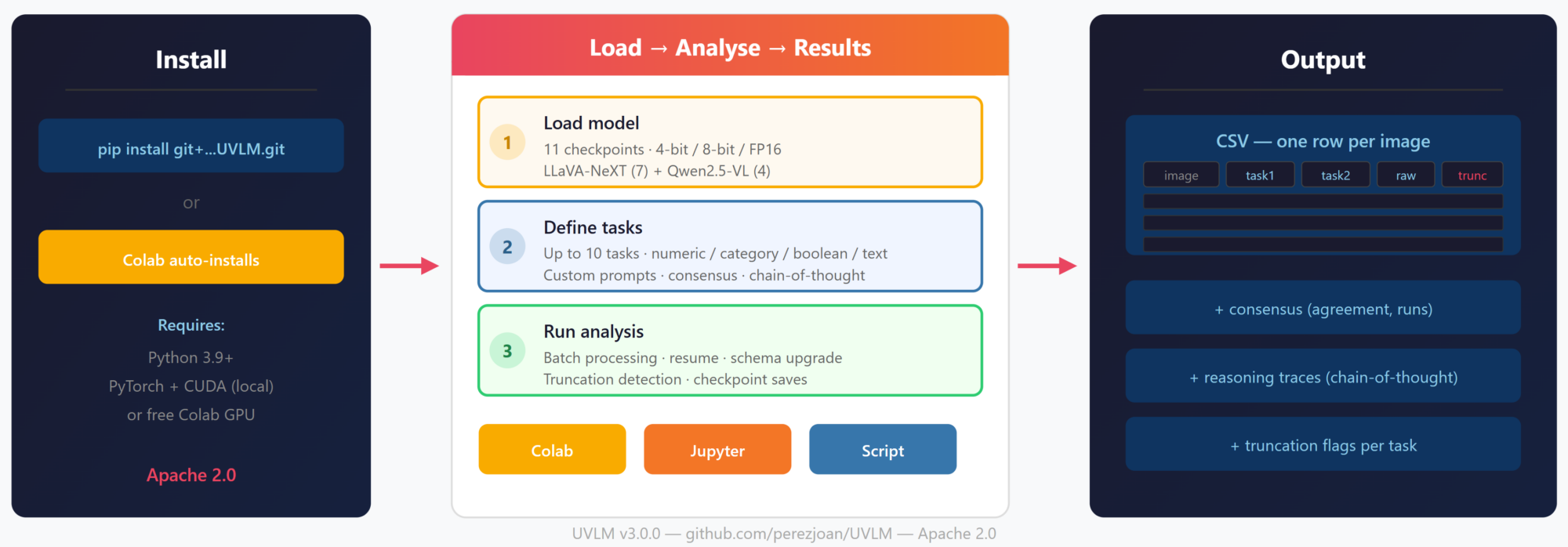
Google Colab — zero install. Open the Colab notebook and everything is set up automatically.
Local install — one command: pip install git+https://github.com/perezjoan/UVLM.git
Note: PyTorch with CUDA must be installed separately to match your GPU driver (e.g., `pip install torch torchvision –index-url https://download.pytorch.org/whl/cu128` for CUDA 12.8+).
How It Works
UVLM follows the same three-step workflow across all deployment modes:
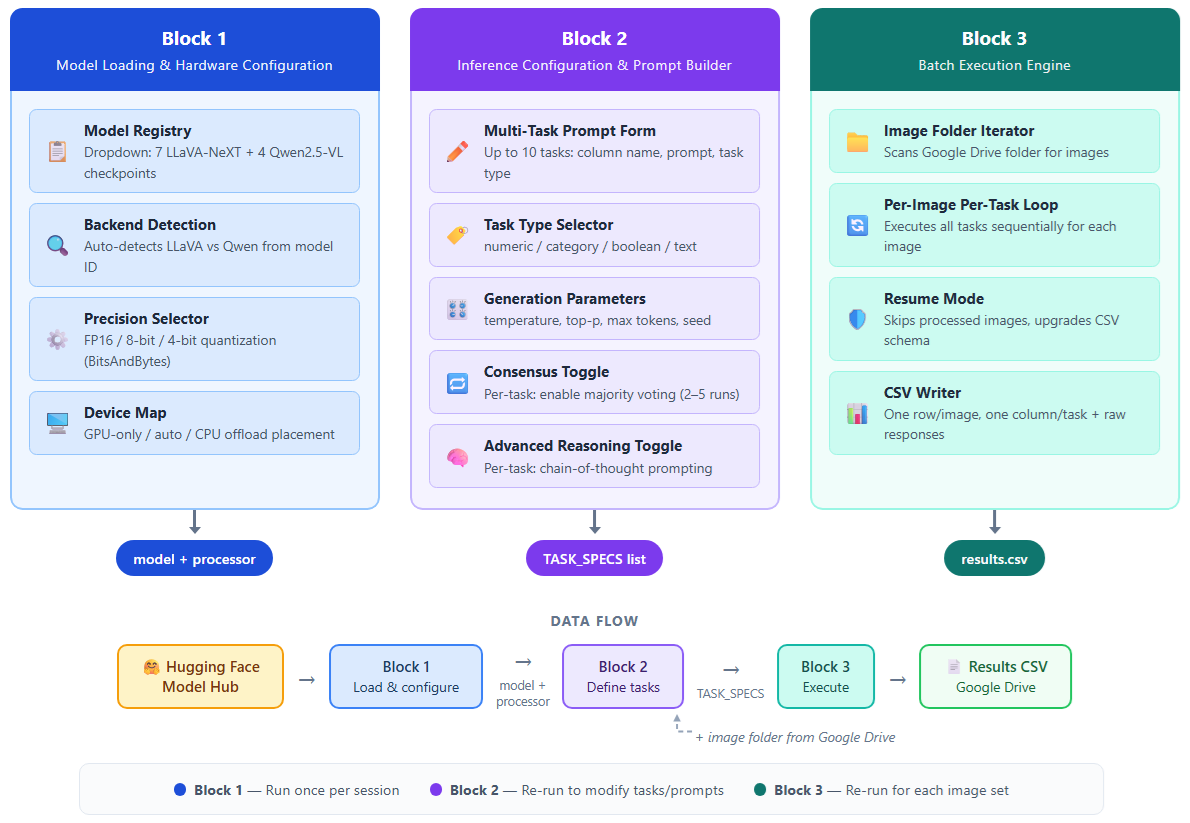
Step 1: Load model. Select from 24 VLM checkpoints — 7 LLaVA-NeXT + 4 Qwen2.5-VL + 4 Qwen3-VL + 6 InternVL3.5 + 3 Gemma 4 models, from 1B to 110B parameters — using a two-level selector: family first, then model.
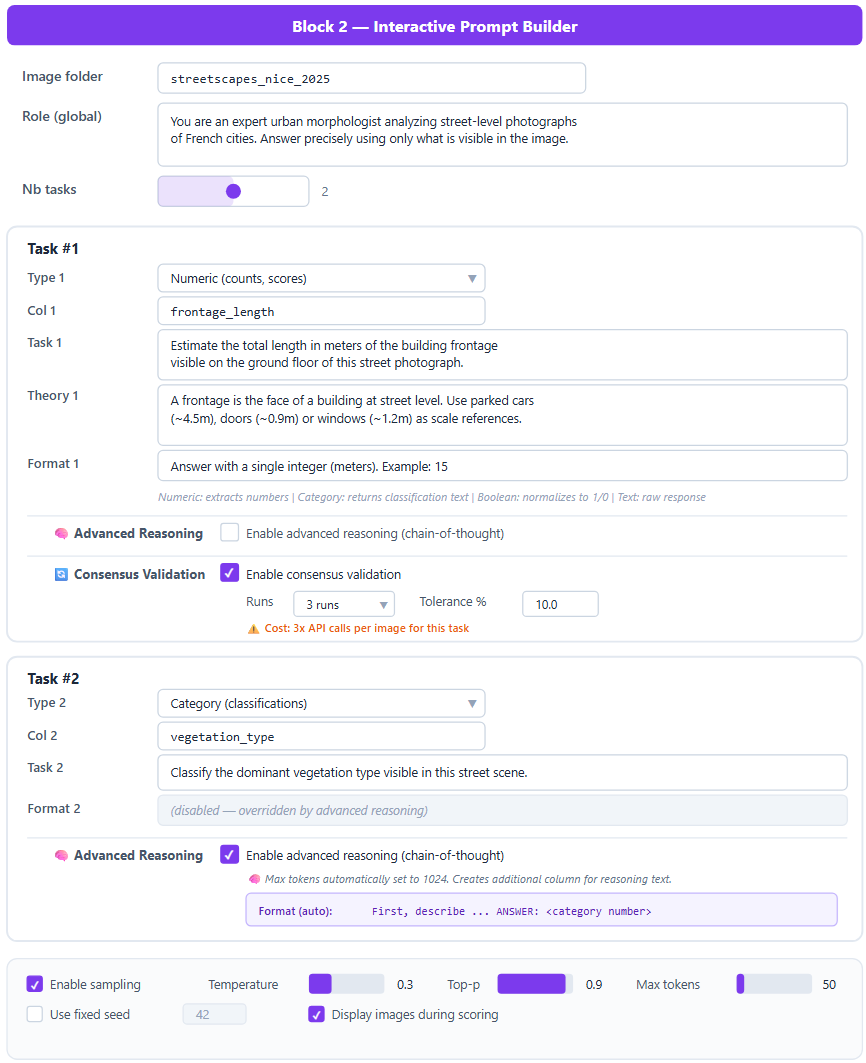
Step 2: Define tasks. Configure up to 10 analysis tasks through a widget-based form (in notebooks) or as a list of task specification dictionaries (in scripts). Each task has a column name, prompt (role + task + theory + format), task type (numeric, category, boolean, text), and optional consensus validation. A max-token slider goes up to 1,500 for custom reasoning strategies.
Step 3: Run analysis. Point to an image folder — Google Drive on Colab, a local path on Jupyter, or any filesystem path in a script. The batch engine processes all images sequentially, writing results to CSV as it goes. Supports resume mode, schema upgrading (add tasks between runs), checkpoint saves every 3 images, and built-in truncation detection.
Three Deployment Modes
Google Colab — Open the notebook, select a GPU runtime, and start working. The package installs itself in the first cell. Images are loaded from Google Drive. Best for: quick experiments, no-setup access, free GPU.
Local Jupyter Notebook — Same widget-based interface running on your own hardware. Images are read from local folders. Data never leaves your machine. Best for: sensitive data, faster model loading, reliable GPU access.
Python Script — Full programmatic control with three lines of code:
from uvlm import load_model, run_inference, parse_response
ctx = load_model(“[Qwen] Qwen2.5-VL 7B Instruct”, precision=”4bit”)
raw, tokens = run_inference(“photo.jpg”, “Count the cars”, ctx)
result = parse_response(raw, “numeric”)
Best for: pipeline integration, automation, batch scripting.
Key Features
- Multi-backend abstraction. Automatically routes to the correct inference pipeline (LLaVA-NeXT, Qwen2.5-VL, Qwen3-VL, InternVL3.5, or Gemma 4) based on the loaded model family — five families, three architecturally distinct pipelines, one interface.
- Multi-task prompt builder. Modular prompts: role + task + theory + format. Four response types with type-specific parsers.
- Consensus validation. Majority voting across 2–5 repeated inferences per task. NA-aware filtering. Agreement ratio tracking.
- Flexible reasoning. Token budget up to 1,500 for user-defined chain-of-thought prompts. Built-in CoT reference mode at 1,024 tokens for standardised benchmarking.
- Truncation detection. Exact token counting from the model output tensor. Per-task _truncated CSV columns with console warnings.
- Quantization support. FP16, 8-bit, and 4-bit precision via BitsAndBytes. Consumer-grade GPUs (T4, L4) for models up to 34B.
- Modular package. Eight Python modules with clean APIs. No global state — all functions accept and return explicit arguments. Easy to extend with new model families.
Supported Models
Family: LLaVA-NeXT
- Mistral 7B | Params: 7B | Min GPU: T4 (free Colab)
- Vicuna 7B | Params: 7B | Min GPU: T4
- Vicuna 13B | Params: 13B | Min GPU: A100
- 34B | Params: 34B | Min GPU: A100
- LLaMA3 8B | Params: 8B | Min GPU: L4
- 72B | Params: 72B | Min GPU: Multi-GPU
- 110B | Params: 110B | Min GPU: Multi-GPU
Family: Qwen2.5-VL
- 3B Instruct | Params: 3B | Min GPU: T4
- 7B Instruct | Params: 7B | Min GPU: T4
- 32B Instruct | Params: 32B | Min GPU: A100
- 72B Instruct | Params: 72B | Min GPU: Multi-GPU
Family: Qwen3-VL
- 2B Instruct | Params: 2B | Min GPU: T4 (free Colab)
- 4B Instruct | Params: 4B | Min GPU: T4
- 8B Instruct | Params: 8B | Min GPU: T4
- 32B Instruct | Params: 32B | Min GPU: A100
Family: InternVL3.5
- 1B | Params: 1B | Min GPU: T4 (free Colab)
- 2B | Params: 2B | Min GPU: T4
- 4B | Params: 4B | Min GPU: T4
- 8B | Params: 8B | Min GPU: T4
- 14B | Params: 14B | Min GPU: L4
- 38B | Params: 38B | Min GPU: A100
Family: Gemma 4
- E2B Instruct | Params: ≈2.3B effective (≈5.1B raw) | Min GPU: 8 GB in FP16 with CPU offload
- E4B Instruct | Params: ≈4.5B effective (≈8B raw) | Min GPU: L4 / A100
- 12B Instruct | Params: 12B | Min GPU: A100
Note: Gemma 4 E-series models use Per-Layer Embeddings — small effective parameter counts but large raw checkpoints. On 8 GB GPUs, run E2B in FP16 (the embedding tables offload to CPU RAM); 4-bit is not usable when offload is required.
Get Started
GitHub: https://github.com/perezjoan/UVLM
Run in Colab: Open the notebook directly from the GitHub repository. Select a GPU runtime, load a model, define your tasks, and run.
Run locally: pip install git+https://github.com/perezjoan/UVLM.git
Blog post: UVLM v3.0.0: From Colab Notebook to Python Package
Citations & Publications
If you use UVLM in your work, please cite:
Perez, J. & Fusco, G. (2026). UVLM: A Modular Python Package for Unified Vision–Language Model Loading, Inference and Comparison. Software 2026, 5(3), 30. https://www.mdpi.com/2674-113X/5/3/30
Read the publication